How to write an implementation plan your team can trust
06 October 2026 · 11 min read · Ivan Blažević
Most features don't go wrong in the code. They go wrong earlier, in a plan that was vague, skipped the hard questions, or was never written down. This is the checklist we use at Rubycode for every implementation plan, why each part is there, and how we make sure a team follows it every time, not only when someone remembers.
Coding agents made writing code cheap. That moved the risk. When an agent can turn a paragraph into a migration, a model, a controller and their specs in ten minutes, the paragraph is what decides whether the feature is right. A good plan is now the most valuable thing a team writes, and a bad one is the most expensive.
What a bad plan looks like
You've seen them. A title and two lines: "Add tags to events. Organizers can tag events and users can filter by tag." Then the questions start, in the pull request, when they're most expensive to answer:
- How many tags can an event have? Who creates a tag, the organizer or an admin?
- Is
Rubythe same tag asruby? What happens to a tag when its last event is deleted? - Does the events list get slower? Is there an index?
- Who agreed to this, and how do we know it worked?
None of these are hard. They just have to be answered by someone, before the code, and written down where the whole team can see them. That's what a plan is for.
What every plan must have
We split a plan into three parts: the decisions only people can make, the design grounded in the real code, and what makes it ready to ship.
1. The decisions
These come from people. A model can't know them, and shouldn't guess.
- What. The change as a user will see it, in two or three short paragraphs. Product language, not implementation.
- Why. The problem, the gap or the business reason. If you can't say why, you're not ready to plan.
- Where. The screens, modules, APIs and jobs it touches.
- Who. The owning team, and who reviews.
- When. A date or a milestone, or "no deadline", said out loud.
- Out of scope. The most underrated section. "No tag suggestions, no following a tag, no renaming tags" saves more review rounds than any other sentence in the plan.
- Success metric. How we'll know it worked. "Within a month, one in five visits to the events list uses a tag." If nobody can name the number, ask whether the feature is needed.
2. The design, grounded in the real code
This is where plans usually hand-wave. Every claim here should be checkable against the application.
- Existing data structure. The models, tables, columns and associations the change touches, with their file paths:
app/models/event.rb,events.organizer_id. A plan that describes a column that doesn't exist is wrong before it starts. - Architecture. The target design and the data flow. Keep the shape of the existing code where you can, and say how old data and new code live together during the rollout.
- Database changes. Every table and column added, changed or removed, with type, nullability, default and indexes, written as the migration code itself. And in an order that's safe to deploy: expand (add the new structure), dual write, backfill, switch reads, then contract (remove the old). Never remove or rename a column in one step: stop using it, add it to
ignored_columns, deploy, then drop it later. AddNOT NULLonly after a default or a backfill. On Postgres, build indexes on big tables concurrently. - Application changes. Models, services, controllers, policies, jobs and UI, one subsection each.
- Infrastructure changes. Queues, external services, feature flags and rollout order. "None" is a valid answer, but write it.
3. Ready to ship
- Risks. The main risks and how each is mitigated, including how to roll back.
- Security. Authorization, data exposure, input validation, and a stated risk level:
Risk Level: LOW,MEDIUMorHIGH. - Performance. Query counts, N+1 risks, indexes, large tables, batch sizes for backfills.
- Monitoring. What to watch after release: errors, jobs, metrics.
- Testing. The model, policy, request and system cases, and acceptance criteria written so that a test can prove each one. "Tags are shown" can't be proven. "An event with the tags ruby and online shows both on its page, in the order they were added" can.
- Outstanding questions. What the team still has to decide, kept separate from what's decided. A plan that answers every question by itself is a plan that assumed things silently.
- Sign-off. Who approved which revision. If the plan changes, the approval doesn't carry over.
Good interview questions ask for decisions
The decisions in part 1 come from an interview: a few questions someone answers before anything is drafted. The quality of the plan depends on the quality of those questions. A question that asks for a description gets a description. A question that asks for a decision gets one.
| Weak question | Better question |
|---|---|
| Describe the feature. | What will a user be able to do that they can't today? |
| Any notes? | What is explicitly out of scope? |
| Who is involved? | Who owns it, and who reviews the pull requests? |
| What are the goals? | How will we know it worked? Name the number that should move. |
| Any deadline? | When is it needed: a date, a milestone, or no deadline? |
Keep the list short and make the important ones required. Every question you add is one people have to answer, every time.
A checklist only works if people follow it
Everything above fits on a page, and most teams already have a page like it in Confluence or Notion. The problem is that a page doesn't stop anyone. On a busy week, the out of scope section is empty, the migration removes a column in one step, and nobody notices until the deploy.
So we wrote the checklist down as code. plan_driven is our open source Ruby gem for Rails teams. Its browser wizard runs the interview, has a model draft the rest of the plan from your answers, your schema and your code, and then checks the draft with guards written in Ruby before anyone can submit it. The model does the writing; the rules are code, so they're the same for every plan and every person.
Configuring the questions and settings, drafting a plan for tags on events, and exporting it as a PDF. Under three minutes.
It keeps a team on the checklist in three ways.
Questions everyone answers
The Configuration page lists the interview's questions. Change a question's wording, make it required or optional, or add your own: the success metric above is one click. The questions are saved in config/plan_driven/interview.yml in your app. Commit it, and the whole team gets the same interview, in the browser and in the terminal.
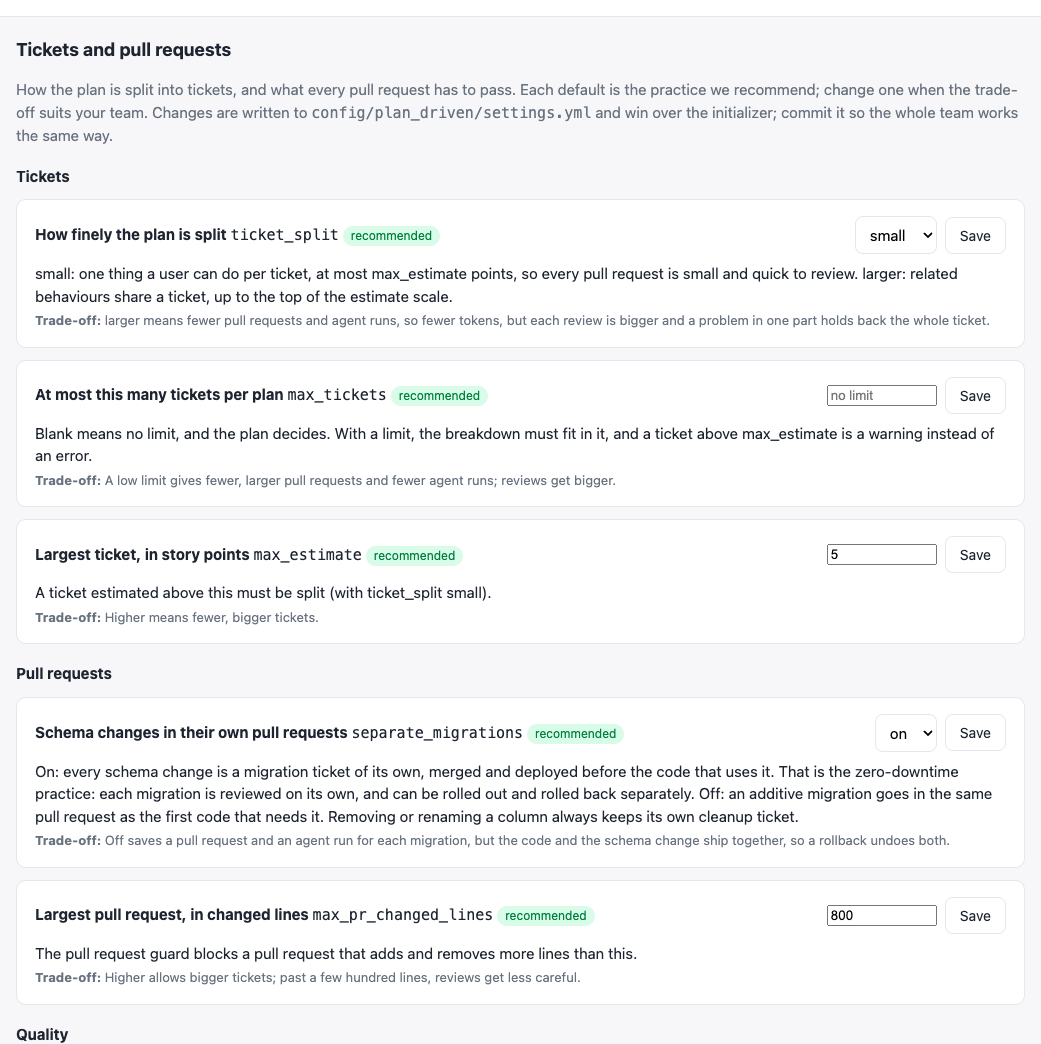
Figure 1. Settings on the Configuration page. Each starts at the recommended practice and says what changing it trades off.
Settings that start at good practice
The same page has the choices that differ between teams, each starting at the practice we recommend and explaining what changing it trades off:
| Setting | Recommended | What it decides |
|---|---|---|
data_model_diagram |
on | A diagram of the tables the plan creates, changes or removes |
ticket_split |
small |
One user-visible behaviour per ticket, or related ones together |
separate_migrations |
on | Schema changes in their own pull requests, deployed before the code |
max_pr_changed_lines |
800 |
The largest pull request the guard accepts |
require_specs_in_pr |
on | Every code pull request changes specs |
cucumber |
on | Every acceptance criterion is proved by a scenario |
They're saved in config/plan_driven/settings.yml. A team that wants fewer, larger pull requests can have them, and the trade-off is written next to the switch.
Guards that check every plan
Before a plan can be submitted, the plan guards check it against the template and against your application:
- every required section is there and isn't too thin to be useful, and none still says
TBDorTODO; - Security states a risk level;
- every model, file path and
table.columnthe plan describes as existing really exists in the app; - database changes are safe to deploy: no column removed or renamed in one step, no
NOT NULLon an existing table without a default or backfill, no blocking index on Postgres; - the database changes include migration code, so the data model can be drawn from it.
When a guard fails, the model is asked to fix the plan and the guards run again. When it still fails, the Submit button stays disabled until a person fixes it.
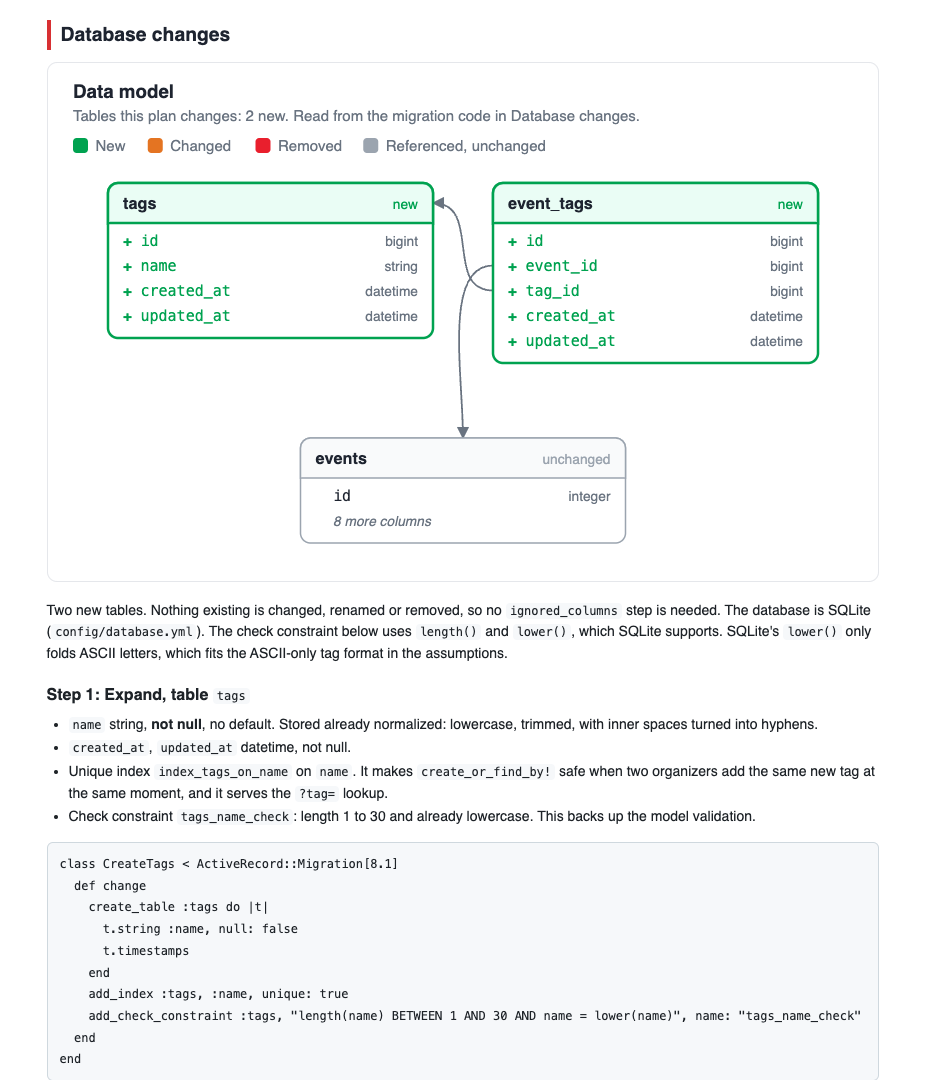
Figure 2. Database changes in the tags plan opens with the data model: the new tags and event_tags tables in green, the events table they reference in grey. It's drawn from the migration code and the real schema, not by the model.
From the interview to a PDF
The flow in the video takes a few minutes:
- Configure once. Add or change the interview questions, and check the settings. Commit both files.
- Answer the interview. On New plan, answer what, why, where, who, out of scope and the success metric.
- Draft. The model reads your schema and code and drafts the rest. The guards check it, and it's fixed until they pass.
- Review. Read every section. Edit one yourself, or tell the model what to change; either way it's a new revision, checked again.
- Export. Write HTML & PDF renders the plan for everyone who reviews and signs it, from developers to the director.
- Approve. Each role approves the current revision. Only then can the plan become tickets, and the tickets go to coding agents.
The PDF is the document people actually read: the answers, the design and the data model, the migrations, the risks, the tests, the open questions and a sign-off table.
Download the plan from the video as a PDF: tags on events, 14 pages, exactly as the wizard drafted and checked it.
The checklist
Copy it into your template, whatever tool you use:
- What, in product terms
- Why, the problem it solves
- Where it lands, and who owns and reviews it
- When it's needed
- What's out of scope
- How we'll know it worked
- The existing models and columns it touches, with file paths
- The architecture and data flow
- Database changes as migration code, expand first and contract last
- Application and infrastructure changes
- Risks and rollback
- Security, with a risk level
- Performance and monitoring
- Acceptance criteria a test can prove
- Outstanding questions, kept apart from decisions
- A sign-off for this revision
Try it
plan_driven is MIT licensed and works with Rails 7.0 to 8.1:
# Gemfile
gem "plan_driven", group: :development
bundle install
bundle binstubs plan_driven
bin/rails generate plan_driven:install
bin/rails db:migrate
bin/plan-driven connect cursor
Then open /plan_driven in development. The README covers every question, setting and guard, and our longer post follows one feature from the plan to merged, tested pull requests.
About Rubycode
plan_driven is built and maintained by Rubycode, a Ruby on Rails
company from Zagreb. We build and rescue Rails applications, and help teams put AI agents to work
safely. Need Ruby or Ruby on Rails engineers, or help putting a planning process like this in place? Get in touch.
- Ivan Blažević, creator of the gem: ivan.blazevic@rubycode.co · +385 99 351 3642 · LinkedIn
- Rubycode: info@rubycode.co · +385 98 980 1880 · rubycode.co
Need engineers who write code like this?
We place vetted developers, designers, QA and delivery specialists with enterprises and startups across the EU. Tell us what you need and we'll shortlist people who fit.
Book a 30-minute callMore from the blog
-
02 October 2026
Where Is the Engineering Work Now? Redesigning Development Around AI
Agents already write most of the code in a sprint, yet we still run it as if every developer types their ow...
-
30 September 2026
The agents write the code. Your team decides what gets built.
plan_driven is an open source Ruby gem that takes a Rails feature from an approved implementation plan to m...
-
29 September 2026
You don't need a heavy agent to count your customers
rails_agent_console puts a small AI inside rails console. Ask in English, read the ActiveRecord query befor...