How to add a domain name hosted on Heroku to name.com provider
14 August 2023 · 1 min read · Rubycode
If you are searching for a domain provider for your website hosted on Heroku, make sure to check whether the domain provider supports ANAME records. Otherwise, you might encounter issues with the root domain and be restricted to setting up only the ‘www’ subdomain. Follow this step-by-step tutorial to configure your Heroku app’s domain with Name.com, your domain provider.
Step 1: Log in to Heroku
Step 2: Click on Settings

Step 3: Click on “Add domain”

Step 4: Enter your domain with www. and without www e.g.
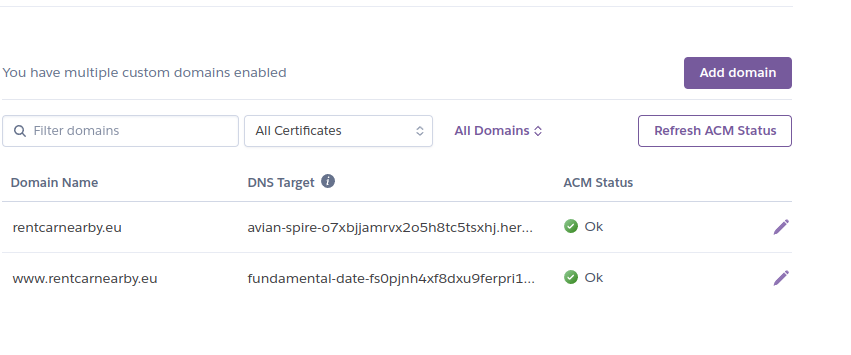
Step 4: Log in to name.com and click on your domain and then “Manage DNS Records”
Step 5: Copy DNS target from Heroku DNS target from a host without www , and add ANAME, e.g. :

Step 6: Copy DNS target from Heroku DNS target from a host with www , and add CNAME, e.g. :

Voilà, after those steps your domain setup is done! It usually takes some time for changes to propagate.
Need engineers who write code like this?
We place vetted developers, designers, QA and delivery specialists with enterprises and startups across the EU. Tell us what you need and we'll shortlist people who fit.
Book a 30-minute callMore from the blog
-
06 October 2026
How to write an implementation plan your team can trust
What every implementation plan for a Rails feature must have, from the decisions only people can make to sa...
-
02 October 2026
Where Is the Engineering Work Now? Redesigning Development Around AI
Agents already write most of the code in a sprint, yet we still run it as if every developer types their ow...
-
30 September 2026
The agents write the code. Your team decides what gets built.
plan_driven is an open source Ruby gem that takes a Rails feature from an approved implementation plan to m...